Text
Shape.Text turns a font into real geometry — nameplates, part numbers, logos,
engraved labels. TrueType (.ttf) glyph outlines are lines and quadratic Béziers
and OpenType/CFF (.otf) outlines are lines and cubic Béziers — both exactly the
sketch vocabulary, so glyphs become sketches with no flattening: text is native in all
three representations, with exact profiles for B-Rep and crisp tessellation for printing.
A nameplate
string fonts = Environment.GetFolderPath(Environment.SpecialFolder.Fonts);string fontPath = new[] { "arial.ttf", "segoeui.ttf", "verdana.ttf" }    .Select(name => Path.Combine(fonts, name)).First(File.Exists);var font = TrueTypeFont.Load(fontPath);
// Lettering runs along +Y so it reads left-to-right from the default iso view.var top = SketchPlane.At((0, 0, 2), Vector3d.UnitY, -Vector3d.UnitX);var lettering = Shape.Text("ENGRCAD", font,                           size: font.EmSizeForCapHeight(9),   // 9 mm capitals                           height: 1.2, top,                           new TextStyle { Align = TextAlign.Center });
var scene = new Scene();scene.Add(new Part("plate", Shape.Box(22, 70, 4), Palette.Steel));scene.Add(new Part("lettering", lettering, Palette.Brass));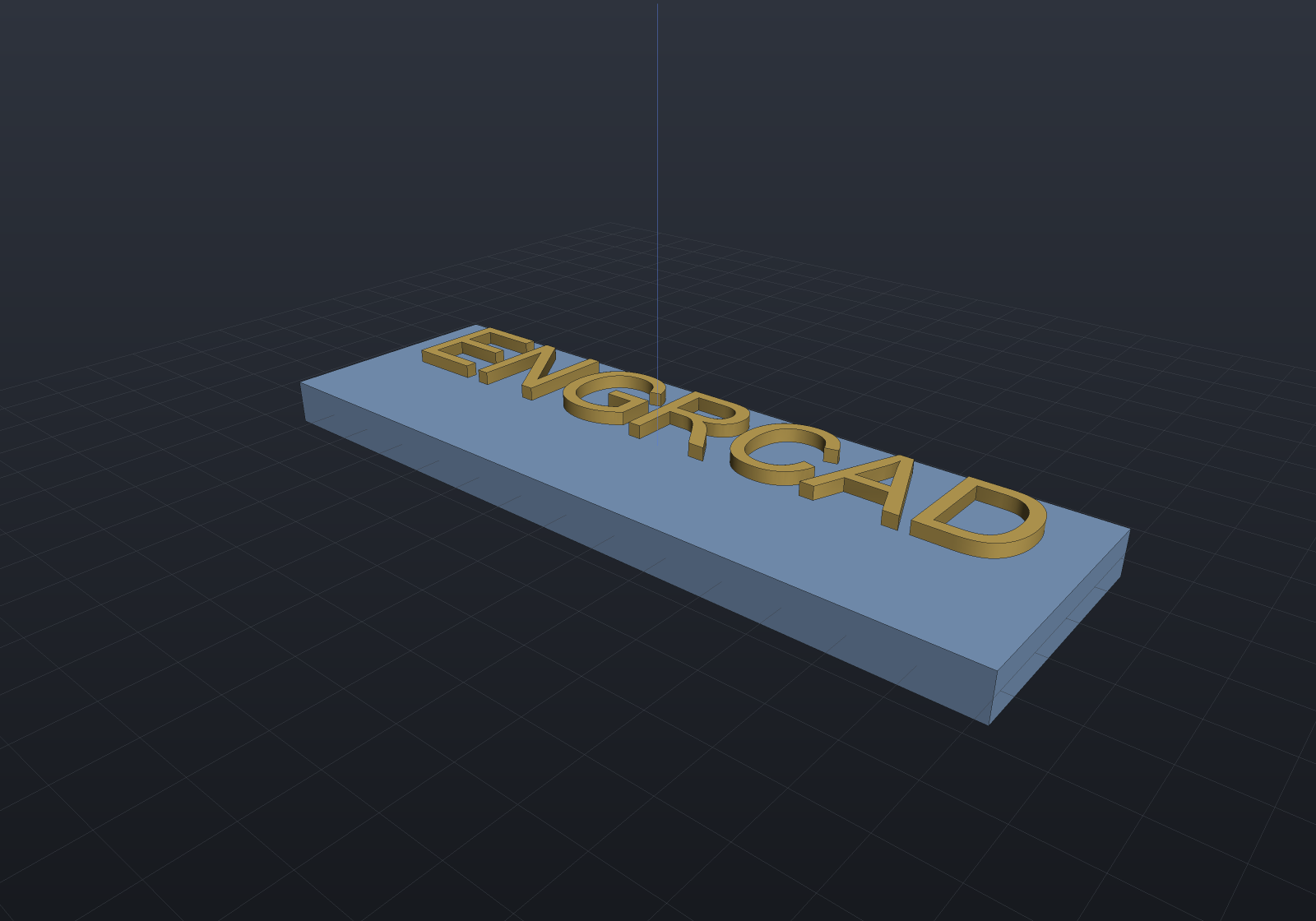
Sizing, origin, and layout
size is the em size — the typographic “12 point”. Drawings usually specify letter
height instead, so font.EmSizeForCapHeight(9) converts: capitals come out exactly 9 mm.
The origin is the baseline at the start of the first line, x along the writing
direction and y up. TextStyle carries alignment (measured per line), tracking, and line
spacing as em multiples; \n starts a new line. Advance widths and pair kerning are
applied automatically — from the OpenType GPOS kern feature when the font has one
(where modern fonts keep it), else from the legacy kern table. font.HasKerning
tells you whether a font supplies either.
A character the font doesn’t contain throws, naming the character and the font, rather than silently dropping it.
TextStyle.VerticalAlign moves the whole block off that baseline — to its Top,
Middle or Bottom. It is measured from the font’s ascender and descender, never
from the ink, so two labels centred on one point line up whether or not either happens
to contain a descender or a capital; TextOutlines.Bounds is still there when you
genuinely want the ink.
Counters are found, not assumed
The holes in O, A, and 8 — counters — are detected by containment: contours are nested by an exact point-in-region test, even depth draws material and odd depth becomes a hole, and an island inside a counter (the middle of a ䷀-style glyph, or a dot inside a ring) becomes its own outline again.
That is deliberate rather than trusting the format. TrueType specifies outer contours clockwise and counters counter-clockwise, but real fonts routinely violate it, so orientation is not a reliable signal — containment is.
Text on a curve
Shape.TextOnPath lays one line along any Curve2d in the sketch plane’s own 2D
coordinates — the ring of lettering round a dial, a bezel, or a curved nameplate.
string fonts = Environment.GetFolderPath(Environment.SpecialFolder.Fonts);var font = TrueTypeFont.Load(new[] { "arial.ttf", "segoeui.ttf", "verdana.ttf" }    .Select(name => Path.Combine(fonts, name)).First(File.Exists));
var dial = Shape.Cylinder(radius: 30, height: 4);var top = SketchPlane.At((0, 0, 2), Vector3d.UnitX, Vector3d.UnitY);
// CLOCKWISE, so the letters stand outward and read right-way-up from outside the dial.double ring = 21;var path = new Arc2d(Vector2d.Zero, ring, Math.PI, -2 * Math.PI);var style = new TextStyle { Align = TextAlign.Center, VerticalAlign = TextVerticalAlign.Bottom };
var marks = Shape.TextOnPath("ENGRCAD", font, size: font.EmSizeForCapHeight(6),                             height: 0.8, path, top, style,                             startOffset: ring * Math.PI / 2);   // a quarter turn along
var scene = new Scene();scene.Add(new Part("dial", dial, Palette.Steel));scene.Add(new Part("marks", marks, Palette.Brass));
// Looking down with +y up the screen, so the quarter-turn offset reads at the top.var camera = new CameraState(-Math.PI / 2, 1.3, 95, (0, 0, 2));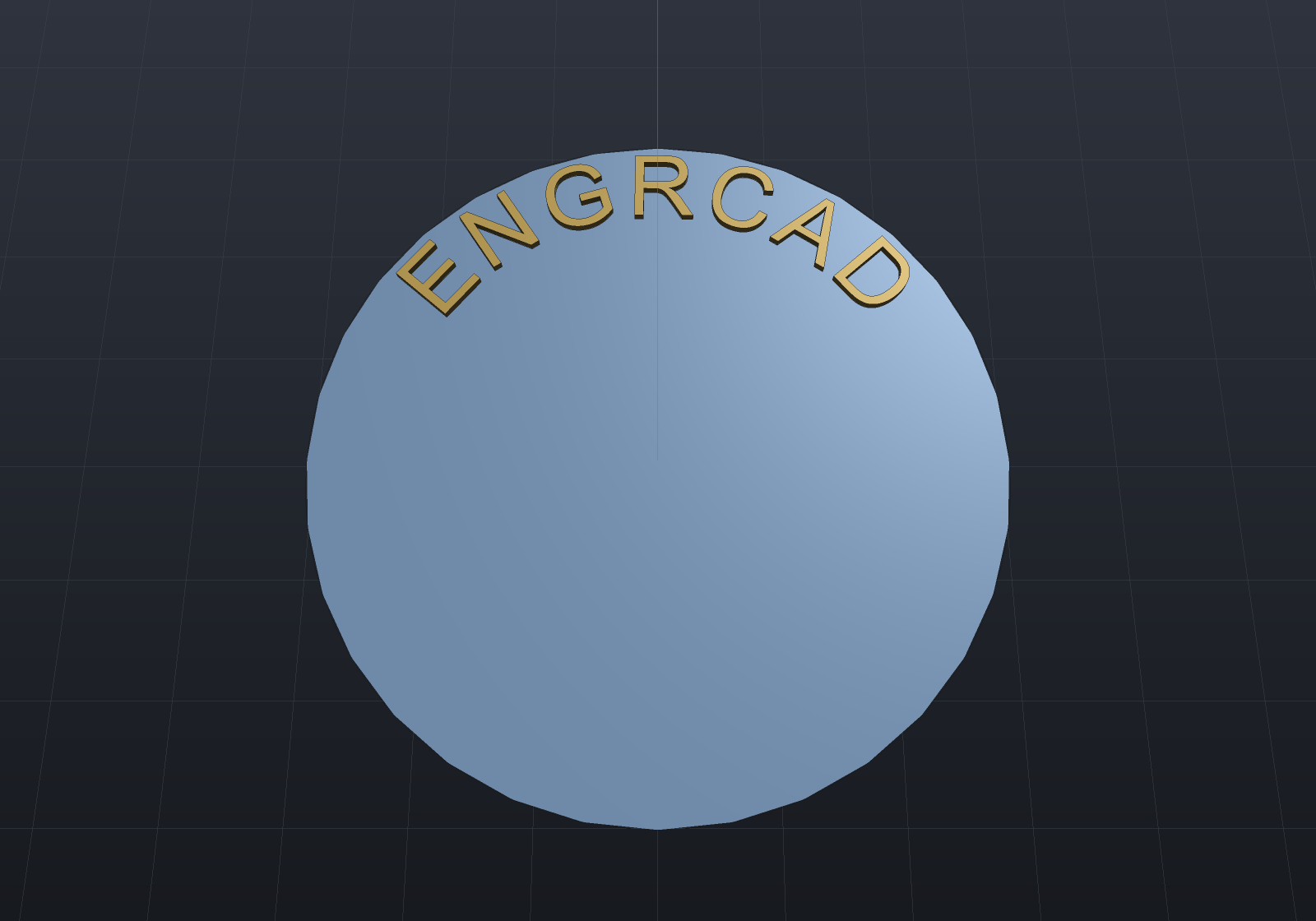
Four conventions carry it, and each was a real choice:
- Glyphs are placed rigidly, not bent. Each letter is rotated to the path’s tangent and translated there; its outline keeps its shape exactly. Only the control points are mapped, which is the curve — a Bézier is an affine combination of its control points at every parameter, the same property that makes a transformed NURBS curve a lossless STEP export. A warp that followed the curve’s curvature is not affine, so no exact Bézier image of a glyph exists under it; text on a path is therefore as exact as straight text, native in all three representations.
- Spacing is arc length, so letters are spaced the way the font asked however the curve happens to be parameterized. A glyph anchors at the middle of its advance (SVG’s rule), so it leans about its own centre instead of pivoting off its left edge.
- A glyph’s “up” is the path’s left normal — the tangent turned a quarter turn counter-clockwise, which is the only choice that makes a straight left-to-right path reproduce ordinary layout exactly. On a counter-clockwise circle that normal points at the centre, so lettering hangs inward; run the path clockwise, as above, for text standing on a rim.
- A closed path is a ring and a run may cross its seam. An open one may not run off either end, and text longer than the path is refused with both lengths named — rather than extrapolating a curve past its own domain.
Upright, not tilted
Pass upright: true to translate each glyph to its path point and leave it un-rotated
— the banner or map-label case, where letters follow the curve’s position but stay
vertical. It still anchors at the middle of the advance and spaces by arc length, so on a
straight horizontal path it reproduces ordinary layout exactly; on a curve the difference
is that a glyph keeps its axis-aligned footprint instead of leaning with the tangent (and
VerticalAlign then lifts along world +Y — the glyph’s own up — rather than the path’s
normal). Upright is a property of the placement, so it is an argument here rather than on
TextStyle.
string fonts = Environment.GetFolderPath(Environment.SpecialFolder.Fonts);var font = TrueTypeFont.Load(new[] { "arial.ttf", "segoeui.ttf", "verdana.ttf" }    .Select(name => Path.Combine(fonts, name)).First(File.Exists));
// A gentle arc across the top of a large circle keeps upright glyphs clear of one another.double r = 120;double sweep = Math.PI * 0.3;var arc = new Arc2d(Vector2d.Zero, r, Math.PI * 0.35, sweep);var banner = Shape.TextOnPath("ENGRCAD", font, size: 8, height: 1, arc,                              style: new TextStyle { Align = TextAlign.Center },                              startOffset: r * sweep / 2, upright: true);   // centred on the arcif (!banner.ToMesh().IsClosed) throw new Exception("upright banner did not build");
Multi-line text works on the paths whose offset is EXACT — a straight line (each line rides a parallel line, reproducing ordinary multi-line layout to nine decimals) and an arc (each line a concentric arc sharing the angular span: a counter-clockwise ring stacks its lines outward, the dial convention, and an inner line reaching past the arc’s centre is refused by name). Every other path keeps the refusal naming those two kinds: a general curve’s offset is a different curve with no exact form and can self-intersect, so the caller builds it deliberately and lays each line on its own path.
Text as a parametric feature
TextFeature(text, font) puts modeled text in a FeatureHistory — an engraved serial
number or an embossed label whose Size, Height, LetterSpacing and Engrave are
[Param] values, so they re-tune through the same seam a design study, a configuration or
the properties panel drives. The text string and font are constructor inputs (a font is a
binary blob, not a value), so changing either replaces the instance — and because a fresh
instance always re-runs, the regeneration cache covers the font without the parameter
snapshot having to name it. Embossing overshoots the surface a little so the boolean stays
transversal (the Shape.Drill doctrine); engraving cuts a recess of the stated depth.
Persistence is honest rather than complete: a font has no data form, so the feature is
opaque to SaveHistory — its type, name and [Param] values are written, and a load skips
it with a warning unless a resolve hook rebuilds it (exactly the contract a ComponentFeature
over a non-catalogue component follows).
Fonts it reads
TrueType outlines: head, maxp, cmap (formats 4 and 12), loca, glyf (simple
and composite glyphs, so accented characters work), hhea/hmtx, plus optional
kern and OS/2. The reader is hand-rolled and dependency-free, like the PNG writer.
OpenType/CFF fonts (.otf, PostScript Type 2 charstrings — cubic Béziers) load the
same way, including CID-keyed fonts and the variable CFF2 flavour;
font.HasPostScriptOutlines reports which flavour you got. A nameplate in an .otf face is exactly the code above with a different path —
TrueTypeFont.Load(@"C:\path\to\SourceSans3-Regular.otf") — and the geometry is just as
exact, with cubic glyph walls becoming exact NURBS profiles in B-Rep.
Variable fonts load too, in both flavours — glyf outlines varied by gvar, and
PostScript CFF2 charstrings blended by their own variation store. See below.
TrueType Collections (.ttc) are rejected with a clear message rather than
partially misread — support for them is future work.
Variable fonts
A variable font ships one set of outlines plus deltas along named axes — weight,
width, optical size — so one file spans a whole family. WithVariation picks a point in
that space and hands back an ordinary font:
var bold = font.WithVariation(("wght", 700), ("wdth", 75));var text = Shape.Text("SLOT", bold, size: 12, height: 2);Everything downstream is untouched: Shape.Text, TextOnPath, TextFeature, layout,
kerning and the three representations all take the instanced font exactly as they take a
static one. Instancing moves control points; it invents no new curve kind, so modelled
variable text is still Native in B-Rep, mesh and implicit.
What the font tells you about itself:
| Member | Answer |
|---|---|
font.IsVariable | Does it carry an fvar table at all? |
font.VariationAxes | Tag, minimum, default, maximum, UI name, hidden flag. |
font.NamedInstances | The named points the designer shipped (“Bold”, “Condensed Light”). |
font.Variation | The coordinate this font object sits at (empty for an un-instanced one). |
font.WithNamedInstance(name) | An instance by its own name. |
font.DefaultSettings | Every axis at its default. |
A coordinate outside an axis’s range clamps rather than throwing (the specification’s own rule — a design space has edges), and an unknown axis tag is refused by name.
A whole family from one file, then, without a second font to keep in step:
string fonts = Environment.GetFolderPath(Environment.SpecialFolder.Fonts);var font = TrueTypeFont.Load(Path.Combine(fonts, "bahnschrift.ttf"));var weight = font.VariationAxes.Single(a => a.Tag == "wght");
var plane = SketchPlane.At((0, 0, 2), Vector3d.UnitY, -Vector3d.UnitX);foreach (double w in new[] { weight.Minimum, weight.Default, weight.Maximum }){    var instance = font.WithVariation(("wght", w));    var letters = Shape.Text("SLOT", instance, instance.EmSizeForCapHeight(9), height: 1.2,        plane, new TextStyle { Align = TextAlign.Center });    // ... place it}
The letters get heavier without getting taller — that is what separates a real weight axis from scaling the text, and it is asserted rather than eyeballed: the cap height of a varied glyph does not move with weight.
Why this page has no rendered figure
Every other example here renders a picture from a snippet the documentation build actually
executes. This one does not, and the reason is worth stating rather than leaving as a gap:
the build has no variable font it can rely on. The examples that need a font load one
from the system font folder (arial.ttf, segoeui.ttf, verdana.ttf — present on every
Windows install, including the Server SKU the docs build runs on), and there is no variable
font with that guarantee: Bahnschrift arrived with a Windows 10 desktop update and Segoe UI
Variable is Windows 11 only. A figure that renders on a developer’s laptop and not on the
build machine is worse than no figure — it would either fail the deploy or quietly ship a
picture nobody could regenerate.
So the geometry is verified where it can be checked exactly instead: against synthetic fonts built byte by byte in the test suite, whose deltas are chosen so every expected coordinate is an exact binary fraction, and against whatever real variable font a developer machine happens to have (structural claims only — heavier is heavier, the default instance is bit-identical). If you have one installed, the snippet below runs those checks on it.
Two properties worth knowing
The default coordinate is bit-identical to the un-instanced font. Not close — identical: every region’s scalar is exactly zero at the default, so nothing is added to any point, and the check is a bit comparison rather than a tolerance.
Layout follows the instance’s own advances. A variable font may vary its advance widths
(through HVAR, or through the glyph’s own phantom points where it does not), so a heavier
instance genuinely lays a string out wider — the text is not simply drawn fatter in the same
space. Measured on Segoe UI Variable: "Handgloves" at 100 em units lays out 493.85 at
the light end of the weight axis and 556.59 at the heavy end, 12.7% wider.
Both are checked here on whatever variable font this machine has, and skipped when it has none:
string fonts = Environment.GetFolderPath(Environment.SpecialFolder.Fonts);string? path = new[] { "bahnschrift.ttf", "SegUIVar.ttf" }    .Select(name => Path.Combine(fonts, name)).FirstOrDefault(File.Exists);
if (path is not null){    var font = TrueTypeFont.Load(path);    var weight = font.VariationAxes.Single(a => a.Tag == "wght");
    // Layout follows the instance's own advances.    double light = TextOutlines.AdvanceWidth("Handgloves", font.WithVariation(("wght", weight.Minimum)), 100);    double heavy = TextOutlines.AdvanceWidth("Handgloves", font.WithVariation(("wght", weight.Maximum)), 100);    if (heavy < light - 1e-9)        throw new Exception($"a bold instance should not lay out narrower: {heavy} vs {light}");
    // The default coordinate reproduces the un-instanced outlines exactly.    var defaulted = font.WithVariation();    foreach (char c in "Handgloves")    {        if (!font.TryGetGlyphIndex(c, out int index))            continue;        var plain = font.GetGlyph(index);        var same = defaulted.GetGlyph(index);        for (int k = 0; k < plain.Contours.Count; k++)            for (int i = 0; i < plain.Contours[k].Points.Count; i++)                if (BitConverter.DoubleToInt64Bits(plain.Contours[k].Points[i].Position.X)                    != BitConverter.DoubleToInt64Bits(same.Contours[k].Points[i].Position.X))                    throw new Exception($"the default instance moved a point of '{c}'");    }}
What it reads, and what it refuses
Read: fvar (axes and named instances), avar version 1 (the piecewise segment maps that
warp a normalised coordinate), gvar (per-glyph deltas — shared and embedded peak tuples,
intermediate regions, shared and private packed point numbers, packed deltas, and IUP
for the points a tuple does not name), the four phantom points that carry a varied
advance, composite glyphs (whose component offsets vary), HVAR where present, and
CFF2 (vsindex/blend over an item variation store).
Refused by name, each for its own reason rather than as a gap to be discovered:
avarversion 2 — its axis-mapping graph can make one axis’s value depend on another, which is a different normalisation, not a bigger table.cvar— hinting deltas; this kernel never runs the hinting interpreter.MVAR/VVAR— varied metrics (line gap, underline, vertical advances) that nothing here consumes yet.STAT— the style-attribute table a UI uses to name a coordinate; it carries no geometry.- Feature variations (
GSUB/GPOSFeatureVariations) — substituting a different glyph past a coordinate threshold, which changes which outline is drawn rather than where its points are.
Persistence
A variation is data, and it still does not travel through SaveHistory — because the
font does not. A TextFeature carries its font as a constructor input, a font is a
binary blob with no data form, and the feature is already opaque to whole-history
persistence (its type, name and [Param] values are written; a load skips it with a warning
unless a resolveOpaque hook rebuilds it). The variation travels with the font object the
hook supplies, so there is nothing extra to serialize and — more usefully — no way for a
saved coordinate to disagree with the font it was measured against.
Engraving
Cutting lettering into a body is a plain subtraction, and it is exact — a whole word
lowers to a single-shell B-Rep whose volume is the plate minus the glyph section times
the pocket depth. Put the sketch plane at the pocket floor and let the tool overshoot
the face, the same rule Shape.Drill follows so booleans never meet coplanar faces:
string fonts = Environment.GetFolderPath(Environment.SpecialFolder.Fonts);var font = TrueTypeFont.Load(new[] { "arial.ttf", "segoeui.ttf", "verdana.ttf" }    .Select(name => Path.Combine(fonts, name)).First(File.Exists));var style = new TextStyle { Align = TextAlign.Center };
var pocket = SketchPlane.At((0, 0, 1), Vector3d.UnitX, Vector3d.UnitY);   // face at z = 2var engraved = Shape.Box(70, 22, 4)             - Shape.Text("ENGRCAD", font, 12, height: 1.5, pocket, style);   // 1 mm deep
// Exact: the plate minus the glyph section times the 1 mm depth. The only error is// the tessellator chording the curved glyph outlines.double section = TextOutlines.Sketches("ENGRCAD", font, 12).Sum(s => s.Area());var mesh = engraved.ToMesh();if (!mesh.IsClosed || Math.Abs(mesh.Volume() - (70 * 22 * 4 - section)) > 0.05)    throw new Exception($"engraving is off: {mesh.Volume()}");
Two things to know:
- Keep the lettering inside the face. A glyph that runs off an edge makes a cut chain crossing the boundary part-way, which the face splitter rejects — loudly.
- Flush embossing does not fuse. Text placed exactly on a face is a coplanar pair, so the union leaves the body and the glyphs as touching shells (right volume, several shells). Sink the lettering a fraction into the face — sketch plane 0.1 mm below, 0.1 mm added to the height — and the boolean fuses into one shell.
Where the exact route refuses, the error message names the fallback:
Shape.From(result.ToImplicit()).ToMesh(quality), which is exact as a field and always
available (raise SdfResolution for crisp lettering).