Scripting (.csx models)
C# is EngrCAD’s SCAD language — a model is code either way. The .csx route drops
the project file: one script, run through tools/EngrCAD.Script, with the same live
loop the compiled workflow gets from dotnet watch:
dotnet run --project tools/EngrCAD.Script -- samples/scripts/bracket.csx # live windowdotnet run --project tools/EngrCAD.Script -- samples/scripts/bracket.csx --view # static windowdotnet run --project tools/EngrCAD.Script -- samples/scripts/bracket.csx --export bracket.stepdotnet run --project tools/EngrCAD.Script -- samples/scripts/bracket.csx --render bracket.pngIn the live window, saving the .csx re-runs it and swaps the scene in place —
camera preserved, a script error keeps the last good scene and shows in the overlay
(the runner watches the file and drives the viewer’s own hot-reload path, so the
behavior is identical to a dotnet watch edit). --export and --render take every
argument EngrCad.Run takes (--render-style, --section, STL/OBJ/STEP by
extension).
The script contract is one line: define Scene scene = ...; (or end with a Scene
expression). It is the same contract as this documentation’s own executable snippets,
compiled through the same Roslyn scripting seam with the same namespaces imported — a
fence that works on this site works as a script verbatim, and vice versa.
// bracket.csx — parameters at the top, save the file and the window follows.double width = 64, depth = 42, thickness = 8;
Shape BossedPlate(double w, double d, double t, double bossD){    var plate = Shape.Extrude(Sketch.RoundedRectangle(w, d, 6), t);    var boss = Shape.Cylinder(bossD / 2, 1.5 * t).Translate(0, 0, 1.25 * t);    return plate | boss;   // boss overlaps INTO the plate: transverse, never coplanar}
var scene = new Scene();scene.Add(new Part("bracket", BossedPlate(width, depth, thickness, 18), Palette.Steel));
The full version of this script lives at samples/scripts/bracket.csx.
Reusable parametric components are plain C# methods
There is no special “module” construct and none is needed: a reusable parametric
component is a method that takes parameters and returns a Shape (or a Part) —
BossedPlate above. That is the whole pattern, and it is deliberately the same in
every tier of the toolchain:
- in a
.csxscript, define the method in the script (or#loada shared.csxof your components); - in a compiled model program, put your component methods in a class library,
reference it from any design, and get refactoring, tests and NuGet packaging for
free — this is where the
.csxroute hands over to the live-modeling loop (EngrCad.Run+dotnet watch), which is the same experience with a project file; - for components that must regenerate, cache, suppress and serialize inside a design,
wrap the method in a
Feature— and for hardware that also prepares its host, aHardwareComponent.
// The component-method pattern, as this page's own executable example: one method,// three differently-sized instances.Shape Spacer(double outerD, double boreD, double height) =>    Shape.Cylinder(outerD / 2, height)        .Drill(HoleSpec.Simple(boreD), [new Vector2d(0, 0)], height * 1.05,               SketchPlane.At((0, 0, height / 2), Vector3d.UnitX, Vector3d.UnitY));
var scene = new Scene();var tab = scene.AddTab("spacers");tab.Add(new Part("S", Spacer(12, 5, 6).Translate(-18, 0, 3), Palette.Steel));tab.Add(new Part("M", Spacer(16, 6, 10).Translate(0, 0, 5), Palette.Brass));tab.Add(new Part("L", Spacer(22, 8, 16).Translate(22, 0, 8), Palette.Sage));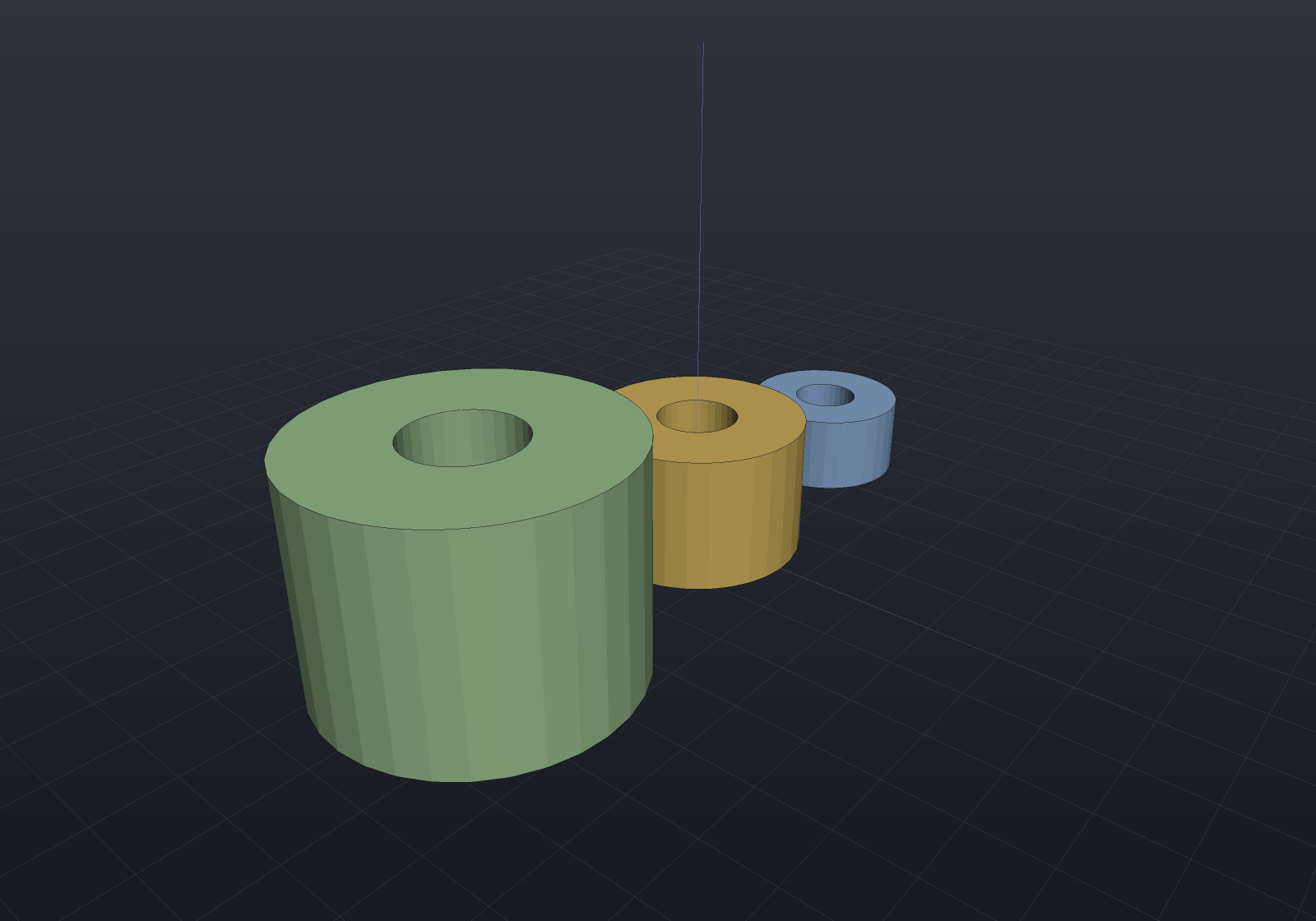
When to choose which
| Route | Startup | You get |
|---|---|---|
.csx + EngrCAD.Script | nothing but a text file | the SCAD loop: edit, save, see |
console project + EngrCad.Run | dotnet new console + two references | hot reload via dotnet watch, a debugger, tests, NuGet — the product’s core experience |
Both run the identical kernel and viewer; the .csx runner is a thin tool (about a
hundred lines over the EngrCad.Run front door), not a second product.