Materials & mass
A Part can say what it is made of. Material carries a name, a mass density,
an optional display colour and — optionally — the analysis properties a simulation
needs (Young’s modulus, Poisson’s ratio, conductivity, specific heat, expansion).
It is one type, in EngrCAD.Core, shared by the document model and by
structural, thermal, modal
and buckling analysis, so the density a bill of materials weighs
a part with is the density a solve integrates.
// A catalogue material carries no colour (appearance is a finish, not a property of// the stuff), so WithColor is how a design states one. Nothing else changes.var steel     = Materials.Steel.WithColor(new PartColor(0.60f, 0.64f, 0.70f));var aluminium = Materials.Aluminium6061.WithColor(new PartColor(0.80f, 0.82f, 0.85f));var brass     = Materials.Brass.WithColor(new PartColor(0.85f, 0.72f, 0.38f));
// `.Of(material)` sets Part.Material and returns the part, so it fits in the// expression that builds it.var basePlate = new Part("base plate", Shape.Box(120, 80, 10)).Of(steel);var cover     = new Part("cover", Shape.Box(120, 80, 6)).Of(aluminium);var pillar    = new Part("pillar", Shape.Cylinder(6, 30)).Of(brass);
var rig = new Assembly("rig");rig.Add(basePlate, Frame3d.FromXY((0, 0, 5), Vector3d.UnitX, Vector3d.UnitY));rig.Add(cover, Frame3d.FromXY((0, 0, 43), Vector3d.UnitX, Vector3d.UnitY));foreach (var (x, y) in new[] { (48.0, 28.0), (-48.0, 28.0), (-48.0, -28.0), (48.0, -28.0) })    rig.Add(pillar, Frame3d.FromXY((x, y, 25), Vector3d.UnitX, Vector3d.UnitY));
var scene = new Scene();scene.AddTab("rig").Add(rig);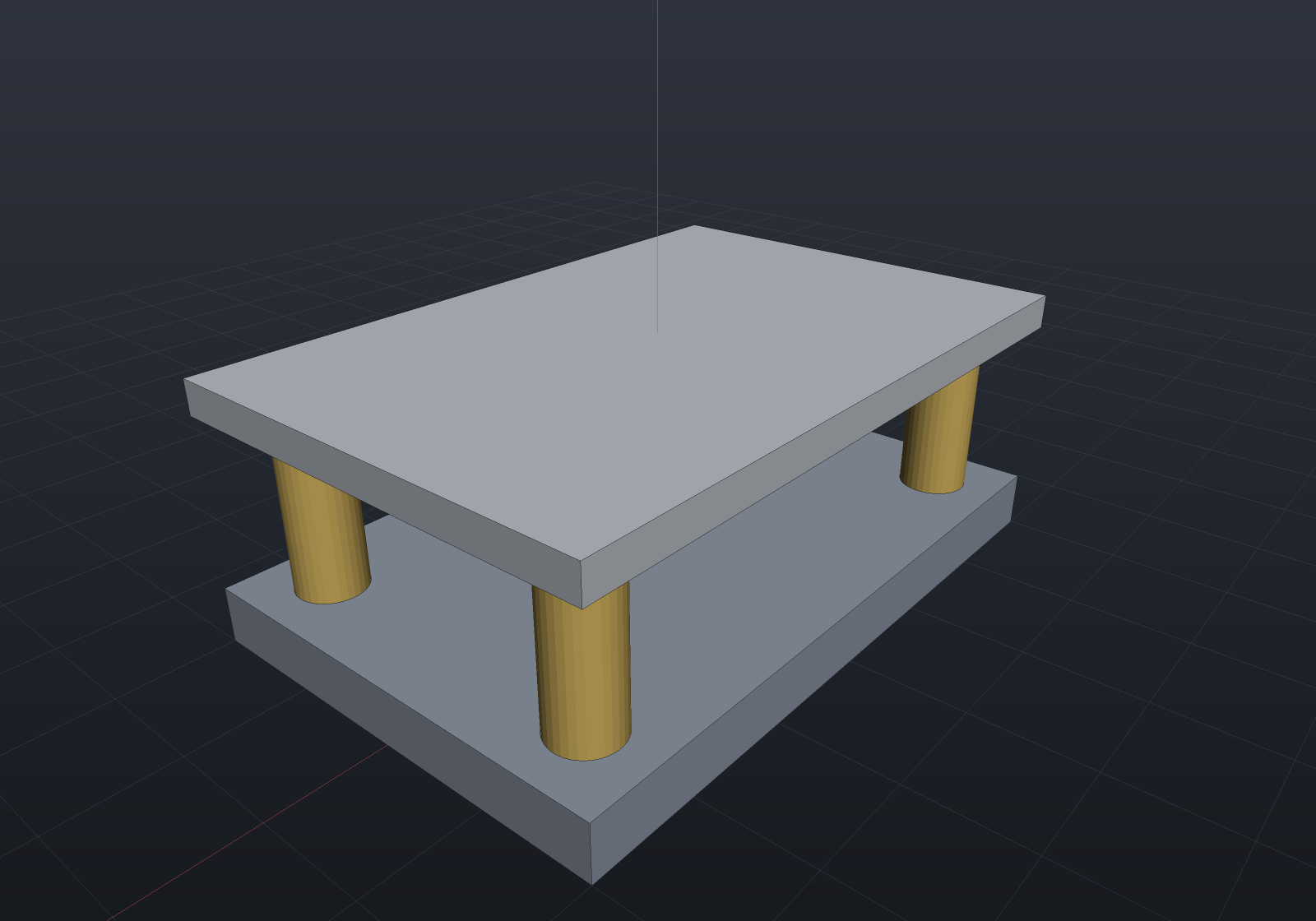
Units: one convention, stated once
Densities are in tonne/mm³ — the consistent mm / N / MPa / tonne / s system
EngrCAD.Core.ModelUnits states for the whole repository. Structural steel is
7.85e-9, not 7850 and not 7.85e-6.
That is not an arbitrary pick. A density is either a number an equation consumes or a number a report prints, and only the second can be converted afterwards: a mass matrix has to balance against a stiffness in MPa and a length in mm with no room for a factor, whereas mass properties form exactly one product from the density and can convert it at the end. So the convention lives where it cannot be converted, and the readable units are accessors.
// Transcribing a datasheet: type the kg/m3 figure, never the exponent.var delrin = new Material("Delrin",    density: ModelUnits.DensityFromKilogramsPerCubicMetre(1410));
if (Math.Abs(delrin.Density - 1.41e-9) > 1e-20) throw new Exception("tonne/mm3");if (Math.Abs(delrin.DensityKilogramsPerCubicMetre - 1410) > 1e-6)    throw new Exception("reads back as the datasheet figure");
// A mass computed from it is therefore in TONNES; grams and kilograms are accessors.var block = new Part("block", Shape.Box(100, 20, 5)).Of(Materials.Aluminium6061);double tonnes = block.MassProperties().Mass; // 10 000 mm3 x 2.7e-9if (Math.Abs(ModelUnits.MassToGrams(tonnes) - 27.0) > 1e-6) throw new Exception("27 g");if (Math.Abs(block.MassGrams()!.Value - 27.0) > 1e-6) throw new Exception("27 g");| Quantity | Unit | Steel reads |
|---|---|---|
| Length | mm | — |
| Force | N | — |
| Stress, modulus | MPa = N/mm² | E = 210 000 |
| Density | tonne/mm³ | 7.85e-9 |
| Mass | tonne | ModelUnits.MassToGrams / MassToKilograms |
| Conductivity | mW/(mm·K) | 50 — numerically the SI W/(m·K) |
| Specific heat | mm²/(s²·K) | 4.60e8 — the SI J/(kg·K) × 1e6 |
| Gravity | mm/s² | ModelUnits.Gravity = 9806.65 |
The SI system (m / N / Pa / kg) is equally consistent and works identically; what does not work is mixing them, which nothing here can detect — hence the conversions.
Mass properties need no density argument
Part.MassProperties() reads Part.Material, so an assembly total is one call.
Parts with no material contribute density 1, which makes their mass a copy of their
volume — the honest answer when nobody has said what they are made of, rather than a
silent zero. The explicit density overload is still there for a part whose material
is not modelled.
var steel = new Part("bracket", Shape.Box(60, 40, 8)).Of(Materials.Steel);var cover = new Part("cover", Shape.Box(60, 40, 3)).Of(Materials.Aluminium6061);
var rig = new Assembly("rig");rig.Add(steel, Frame3d.WorldXY);rig.Add(cover, Frame3d.FromXY((0, 0, 20), Vector3d.UnitX, Vector3d.UnitY));
var total = rig.Flatten().MassProperties();          // <- the whole calldouble grams = ModelUnits.MassToGrams(total.Mass);
// 19 200 mm3 of steel (150.72 g) + 7 200 mm3 of aluminium (19.44 g).if (Math.Abs(grams - 170.16) > 1e-6) throw new Exception($"expected 170.16 g, got {grams}");
// The centre of mass hugs the heavier part, and the bulk density is the mixture's.if (total.Centroid.Z > 6) throw new Exception("the steel bracket dominates");if (Math.Abs(total.Density - total.Mass / total.Volume) > 1e-18)    throw new Exception("bulk density = total mass / total volume");
In the bill of materials
A MATERIAL column appears in Bom.ToText() and ToCsv() as soon as any line
states one, and not otherwise — a column that would be empty on every row is not
printed. Mass is opt-in (mass: true) rather than automatic, because it is the
only part of a bill of materials that evaluates geometry:
var plate = new Part("base plate", Shape.Box(120, 80, 10)).Of(Materials.Steel);var pillar = new Part("pillar", Shape.Cylinder(6, 30)).Of(Materials.Brass);var shim = new Part("shim", Shape.Box(20, 20, 1));          // material not stated
var rig = new Assembly("rig");rig.Add(plate, Frame3d.WorldXY);foreach (var (x, y) in new[] { (48.0, 28.0), (-48.0, 28.0), (-48.0, -28.0), (48.0, -28.0) })    rig.Add(pillar, Frame3d.FromXY((x, y, 25), Vector3d.UnitX, Vector3d.UnitY));rig.Add(shim, Frame3d.FromXY((0, 0, 60), Vector3d.UnitX, Vector3d.UnitY));
var bom = Bom.For(rig);Console.WriteLine(bom.ToText(mass: true));//  QTY  ITEM        KIND  MATERIAL           MASS (g)  TOTAL (g)  WHERE//    1  base plate  made  Structural steel    753.6      753.6    rig/base plate//    4  pillar      made  Brass C36000         28.839    115.354  rig/pillar, ...//    1  shim        made  -                        -          -   rig/shim
var plateLine = bom.Lines.Single(l => l.Item == "base plate");if (Math.Abs(plateLine.UnitMassGrams!.Value - 753.6) > 1e-6)    throw new Exception($"96 000 mm3 of steel is 753.6 g, got {plateLine.UnitMassGrams}");
// An unstated material is an UNKNOWN mass, not a zero: the line reports null, the// text prints "-", the CSV cell is empty, and the footer total says what it covers.if (bom.Lines.Single(l => l.Item == "shim").UnitMassGrams is not null)    throw new Exception("an unstated material has no mass");if (!bom.ToText(mass: true).Contains("over the 2 of 3 items stating a material"))    throw new Exception("the total should say what it covers");
BomLine.Material is the whole Material, not just its name, so a purchasing view
can reach the density; UnitMassGrams and TotalMassGrams are the per-item and
per-line figures.
Bought-in parts weigh themselves
A catalogue component already knows what it is made of, so nothing in
a design has to say that an ISO 4762 screw is steel. HardwareComponent.Material comes
from FastenerMaterials and ToPart() carries it onto the part, which is what a bill of
materials reads:
var build = new ComponentAssembly("plate", Shape.Box(60, 40, 8));var top = SketchPlane.At((0, 0, 4), Vector3d.UnitX, Vector3d.UnitY);build.Place(StandardComponents.CapScrew(6, 20), [new(-20, 0), new(20, 0)], top);build.Place(StandardComponents.Washer(6), [new(-20, 0), new(20, 0)], top);var assembly = build.ToAssembly();build.Host!.Material = Materials.Aluminium6061;      // the one thing the design states
Console.WriteLine(Bom.For(assembly).ToText(mass: true));//  QTY  ITEM              KIND       MATERIAL             MASS (g)  TOTAL (g)  WHERE//    2  ISO 4762 M6x20    catalogue  Alloy steel             5.454     10.908  ...//    2  ISO 7089 M6       catalogue  Carbon steel            1.016      2.033  ...//    1  plate             made       Aluminium 6061-T6     ...
// An ISO 7089 M6 washer is an exact annulus, so its mass has a closed form.var washer = Bom.For(assembly).Lines.Single(l => l.Item.StartsWith("ISO 7089"));double volume = Math.PI / 4 * (12.0 * 12.0 - 6.4 * 6.4) * 1.6;double exact = ModelUnits.MassToGrams(volume * FastenerMaterials.CarbonSteel.Density);if (Math.Abs(washer.UnitMassGrams!.Value - exact) > 1e-5 * exact)    throw new Exception($"expected {exact} g, got {washer.UnitMassGrams}");
The material is the stuff, and an ISO 898-1 property class is not. 8.8, 10.9 and
12.9 name a proof and a tensile stress; all three are steel at 7850 kg/m³, so a 12.9
screw and an 8.8 screw of one size weigh exactly the same and the class lives in the
designation. What does move a mass is a change of substance, and that is what the
catalogue distinguishes — carbon steel, alloy steel, stainless A2 (1.4301) and A4
(1.4401), and brass for the threaded inserts. Stainless is ~2% heavier than carbon
steel and brass ~8% heavier again. Where Materials already states the alloy, the
fastener entry delegates and only renames: one density per alloy, whichever name asks
for it.
One entry deliberately says nothing. A DeepGrooveBearing models two rings and
neither the balls nor the cage, so a density times that volume is measurably less than
the bearing’s real mass — an unstated material reports an honest “unknown” where a
stated one would report the shortfall as a number. A design that wants the lower bound
anyway says so, and because ToPart() caches one part per component, one assignment
covers every occurrence:
var bearing = StandardComponents.Bearing("608");if (bearing.Material is not null) throw new Exception("a v1 bearing states no material");if (bearing.ToPart().MassGrams() is not null) throw new Exception("...so its mass is unknown");
var part = bearing.ToPart().Of(FastenerMaterials.BearingSteel);   // rings only: a LOWER boundif (part.MassGrams() is not > 0) throw new Exception("now it weighs something");
// The same call is how a design states a stainless variant of any catalogue item.var stainless = StandardComponents.CapScrew(6, 20).ToPart().Of(FastenerMaterials.StainlessA2);if (stainless.Material!.Name != "Stainless steel A2 (1.4301)") throw new Exception("A2");
⚠ Like every transcribed table here, FastenerMaterials carries nominal figures for
getting a mass and a stiffness in the right place — verify against the supplier’s
datasheet for the specific grade before production use.
The same material drives an analysis
Nothing has to be restated for a solve. The catalogue entries carry elastic and
thermal properties already, and a document material picks them up with
WithElasticity / WithThermal:
// A document material: a name and a density, nothing more. This is what a bill of// materials is made of, and it is legal to build.var alloy = new Material("Mystery alloy", density: 7.8e-9);if (alloy.HasElasticity) throw new Exception("no modulus stated");
// A structural model refuses it BY NAME — the refusal lives where the property is// needed, not in the constructor, because most parts never see a solver.var mesh = TetMesher.Mesh(Shape.Box(40, 10, 10).ToMesh());try{    _ = new StructuralModel(mesh, alloy);    throw new Exception("should have been refused");}catch (FeaException ex) when (ex.Message.Contains("no Young's modulus")) { }
// The same object with a modulus is accepted.var model = new StructuralModel(mesh, alloy.WithElasticity(200_000, 0.3));if (!model.DefaultMaterial.HasElasticity) throw new Exception("now it has one");
Colour
If a material states a Color, it becomes the default colour of any part
carrying it that has none of its own. A material colour deliberately does not
consume a palette slot, so attaching a material to one part never re-colours the
others — and because no catalogue entry carries a colour, assigning
Materials.Steel to a part moves no pixels at all.
An explicit Part.Color still wins over the material’s, and
DocumentEdits.SetMaterial leaves a part’s colour alone: a material only ever
supplied the default at add time, and silently recolouring a part someone has
already coloured would be a second, hidden edit.
What carries where
- Documents.
Part.Materialround-trips throughDocument.Save/Load; only the properties actually stated are written, so a file for a scene with no materials is byte-identical to what it always was. - The viewer. The properties panel has a material dropdown over the catalogue
(plus “(none)”, and plus the current material when a design built its own or a
catalogue component brought one) — it writes through
DocumentEdits.SetMaterial, so it is one Ctrl+Z step, and it sits above the panel’s mesh gate because saying what a part is made of must not wait for it to tessellate. The Mass row below is the measurement (from the display mesh, so it can never lower a B-Rep on the UI thread), and the BOM overlay shows the material column. - MCP.
describe_partreports the material with its density in both spellings — tonne/mm³ to compute with, kg/m³ to check against a datasheet.