Assemblies
An Assembly is a named list of occurrences — a shared Part or
a nested Assembly, each posed by a rigid Frame3d relative to its parent. Poses
compose down the tree, and assemblies hold references, not copies: one Part
placed ten times is meshed once and drawn ten times with different world matrices.
Tab.Add(assembly) puts an assembly in a viewer tab next to loose parts.
// ONE plate Part and ONE bolt Part, but ten placed instances. The "clamp"// sub-assembly is itself placed twice inside "stack" — the second time lifted and// rotated 90° about Z, carrying its four bolts with it.var plate = new Part("plate",    Shape.Extrude(Sketch.RoundedRectangle(44, 32, 5), 5), Palette.Steel);var bolt = new Part("bolt",    Shape.Cylinder(1.6, 9).Translate(0, 0, 4.5)            // shank, z in [0, 9]    | Shape.Cylinder(3.4, 2.6).Translate(0, 0, 10.3),      // head,  z in [9, 11.6]    Palette.Brass);
var clamp = new Assembly("clamp");clamp.Add(plate);                                          // occurrence "plate", identity poseforeach (var (x, y) in new[] { (15.0, 10.0), (-15.0, 10.0), (-15.0, -10.0), (15.0, -10.0) })    clamp.Add(bolt, Frame3d.FromXY((x, y, 5), Vector3d.UnitX, Vector3d.UnitY));// derived names auto-suffix: "bolt", "bolt.2", "bolt.3", "bolt.4"
var stack = new Assembly("stack");stack.Add(clamp);                                          // sub-assembly at identitystack.Add(clamp, Frame3d.FromXY((0, 0, 22), Vector3d.UnitY, -Vector3d.UnitX));
var scene = new Scene();scene.AddTab("stack").Add(stack);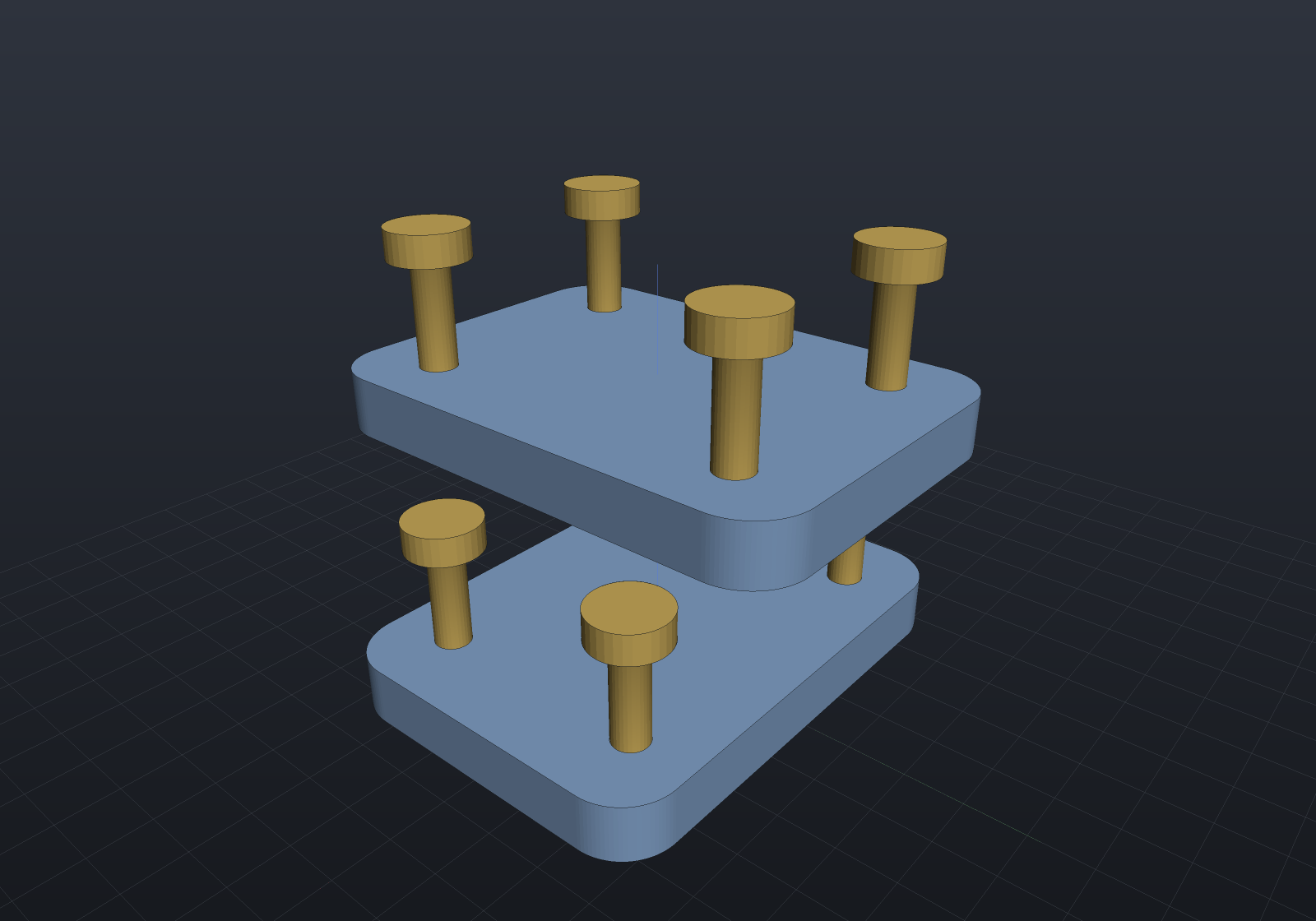
Poses compose, parts are shared
Flattening resolves the tree to PartInstances — (Part, World, Path) — which is
the seam viewers and exporters consume; they never walk assemblies themselves. An
instance’s world matrix is the occurrence frames composed down the tree
(child.Frame.Then(parentWorld)) times the part’s own Transform, and its path
records the route ("stack/clamp.2/bolt"):
var plate = new Part("plate", Shape.Box(44, 32, 5));var bolt = new Part("bolt", Shape.Cylinder(1.6, 9));
var clamp = new Assembly("clamp");clamp.Add(plate);foreach (var (x, y) in new[] { (15.0, 10.0), (-15.0, 10.0), (-15.0, -10.0), (15.0, -10.0) })    clamp.Add(bolt, Frame3d.FromXY((x, y, 5), Vector3d.UnitX, Vector3d.UnitY));
var stack = new Assembly("stack");stack.Add(clamp);stack.Add(clamp, Frame3d.FromXY((0, 0, 22), Vector3d.UnitY, -Vector3d.UnitX));
var instances = stack.Flatten();if (instances.Count != 10)    throw new Exception("two clamps x five occurrences = ten instances");if (!instances.Any(i => i.Path == "stack/clamp.2/bolt.3"))    throw new Exception("occurrence paths should read stack/clamp.2/bolt.3");
// Pose composition: the first bolt sits at (15, 10, 5) inside clamp; clamp.2 is// rotated 90 degrees about Z and lifted 22, so that instance lands at (-10, 15, 27).var placed = instances.First(i => i.Path == "stack/clamp.2/bolt");var origin = placed.World.TransformPoint(Vector3d.Zero);if (origin.DistanceTo((-10, 15, 27)) > 1e-12)    throw new Exception($"unexpected composed pose: {origin}");
// Shared parts mesh once: ten instances, but only two distinct parts to tessellate.var scene = new Scene();scene.AddTab("assembly").Add(stack);scene.PreMesh();if (scene.AllParts.Count() != 2) throw new Exception("expected two distinct parts");if (scene.AllInstances.Count() != 10) throw new Exception("expected ten instances");
Semantics worth knowing:
- Names. Occurrence names are unique per assembly level. Derived names
auto-suffix like CAD occurrence lists (
bolt,bolt.2, …); an explicitname:argument must be unique and cannot contain/(it separates paths). Tab item names are unique across parts and assemblies. - Sharing. The same
Part— or the sameAssembly— may appear under many parents (the graph is a DAG); cycles are rejected atAddtime.Scene.PreMesh()walks each distinct part exactly once, so instancing costs one mesh however many occurrences place it.Occurrence.Frameis mutable, so parametric design code can re-pose occurrences between live reloads. - Loose parts still work. A
Tabholds loose parts (posed by their ownPart.Transform, path = name) next to assemblies;Tab.Instances()flattens both into one ordered list.
Exploded views
An exploded view is a scalar composed into each occurrence’s frame during flattening —
not a separate rendering path. Occurrence.ExplodeOffset is the displacement at factor
1, expressed in the parent’s coordinates so nesting composes, and
Assembly.AutoExplode() derives sensible offsets when you have not:
var top = SketchPlane.At((0, 0, 6), Vector3d.UnitX, Vector3d.UnitY);
var build = new ComponentAssembly("plate", Shape.Box(70, 44, 12), Palette.Sage);build.Place(StandardComponents.CapScrew(5, 16), [new(-24, 0), new(24, 0)], top);build.Place(StandardComponents.TrisertInsert(5), [new(0, 0)], top);
var scene = new Scene();scene.AddTab("exploded").Add(build.ToAssembly("bracket"));
var explode = 1.0;   // 0 assembled, 1 fully exploded; offsets derived by AutoExplode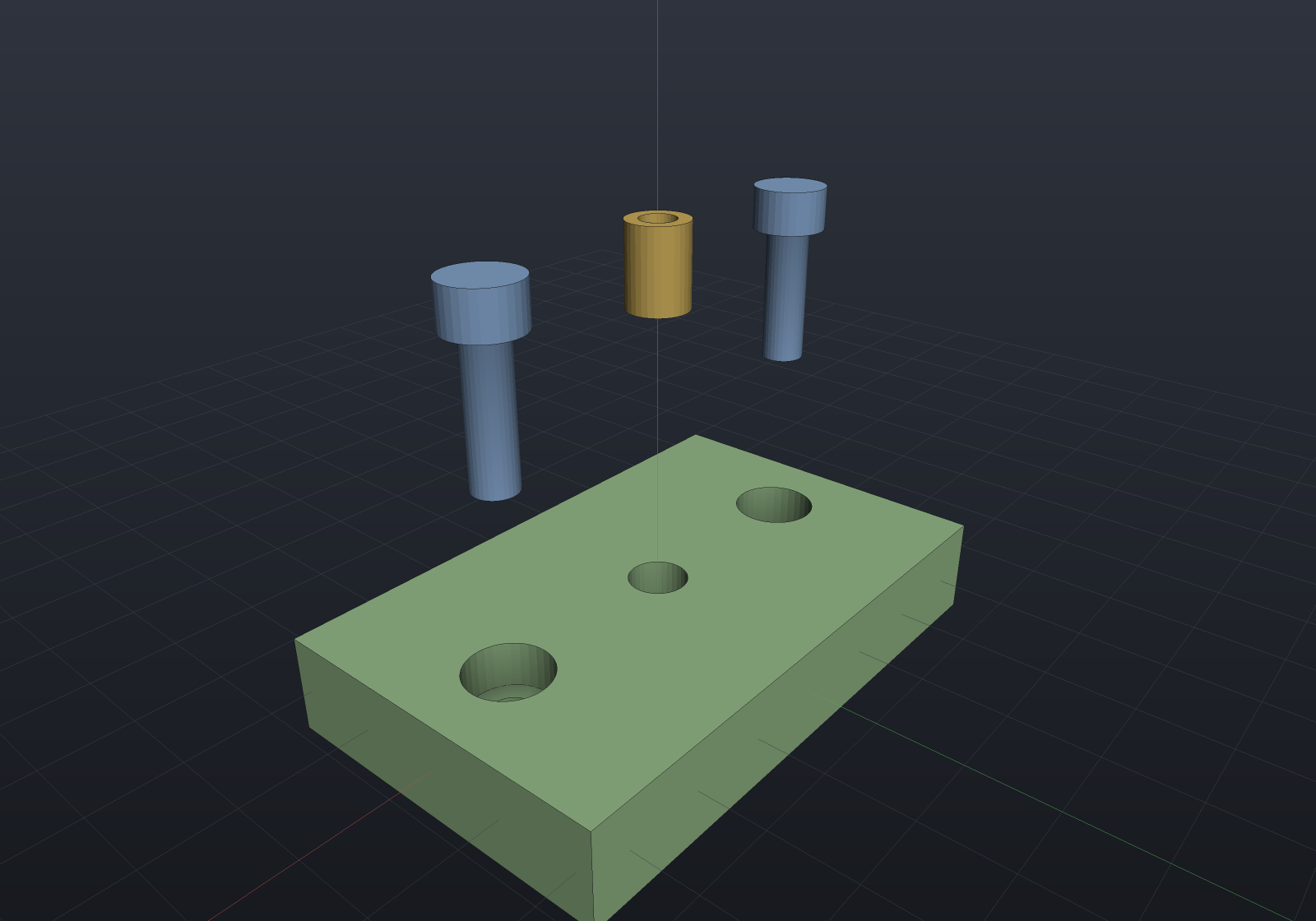
Two things make that picture right. The fasteners travel along their own axes,
because a HardwareComponent body is modelled +Z out of the host — the seating
convention already knows the direction. And the plate does not move: the largest
non-catalogue occurrence is the datum. Deriving directions from the assembly’s
centroid is the obvious idea and a bad one — on a spread-out assembly the centroid
sits in empty space, so every part including the base flies away from nothing.
At factor 0 the frame is returned untouched, so an un-exploded flatten is bit-for-bit what it always was. More usefully, the instance list — count, order, part references — is identical at every factor, which is what lets the viewer animate the slider by swapping matrices alone: no buffer is touched, one mesh and one pick BVH stay shared, and picking follows for free.
Dogleg paths
A straight diagonal is fine for a picture and wrong for an instruction: it reads as
“insert it at an angle”, and a fitter will try. Occurrence.ExplodePath puts waypoints
between the assembled position and the offset, so a part comes straight out of its bore
before it moves aside:
var stack = new Assembly("stack");stack.Add(new Part("body", Shape.Box(20, 20, 8)));var lid = stack.Add(new Part("lid", Shape.Box(20, 20, 3).Translate(0, 0, 8)));
lid.ExplodeOffset = new Vector3d(30, 0, 40);   // where it ends uplid.ExplodePath.Add(new Vector3d(0, 0, 40));   // ... via straight up
// The factor maps to ARC LENGTH, so the part crosses the corner at constant speed:// legs of 40 and 30 make 70, and half way is 35 along -- still on the vertical leg.var half = lid.ExplodeDisplacement(0.5);if (Math.Abs(half.X) > 1e-9 || Math.Abs(half.Z - 35) > 1e-9)    throw new Exception($"half way should still be going up, got {half}");
// The ends stay exact whatever the path.if (lid.ExplodeDisplacement(0) != Vector3d.Zero) throw new Exception("0 is assembled");if (lid.ExplodeDisplacement(1) != lid.ExplodeOffset) throw new Exception("1 is the offset");
An empty path is the straight line, so nothing changes for an assembly that never sets
one. ExplodeDisplacement(factor) is the single rule the flattening walk, an
ExplodeTrack animation and any future leader-line renderer all read,
and paths survive a document round trip.
Bills of material
Bom.For counts occurrences per distinct Part over the same flattening, so nested
sub-assemblies roll up with no second traversal:
var top = SketchPlane.At((0, 0, 6), Vector3d.UnitX, Vector3d.UnitY);var build = new ComponentAssembly("plate", Shape.Box(70, 44, 12));build.Place(StandardComponents.CapScrew(5, 16), [new(-24, 0), new(24, 0)], top);build.Place(StandardComponents.TrisertInsert(5), [new(0, 0)], top);
var bom = Bom.For(build.ToAssembly("bracket"));Console.WriteLine(bom.ToText());
// One plate we make, three fasteners we buy.if (bom.Manufactured.Sum(l => l.Quantity) != 1) throw new Exception("expected one made part");if (bom.Hardware.Sum(l => l.Quantity) != 3) throw new Exception("expected three bought-in items");
Part.Hardware — which HardwareComponent.ToPart() sets — is what splits bought-in
from made, and the same flag gives the explode heuristic its fastener axis. ToCsv()
and the indented Bom.Structured view are there too; the structured view’s leaf totals
agree with the flat list by construction rather than by a second count.
Lines group by part reference, not by name: two separately-built parts that happen
to share a designation stay two lines, and ByItem() rolls them up for purchasing.
Mates
Occurrence frames are mutable, so mates solve for them. Constraints reference geometry
by explicit local coordinates or by the same semantic BrepQueries selectors features
and dimensions use:
Shape BoredPlate() => Shape.Box(40, 30, 6) - Shape.Cylinder(5, 20);static BrepFace Bore(BrepSolid s) => s.Faces.First(f => f.IsCylindrical(out _, out _, out _));
var rig = new Assembly("rig");var lower = rig.Add(new Part("lower", BoredPlate()));var upper = rig.Add(new Part("upper", BoredPlate()),    Frame3d.FromXY((21, -14, 33), Vector3d.UnitX, Vector3d.UnitY));   // deliberately wrong
var result = new MateSet(rig)    .Ground(lower)    .Add(Mate.Concentric(MateGeometry.CylindricalFace(lower, Bore),                         MateGeometry.CylindricalFace(upper, Bore)))    .Add(Mate.Planar(MateGeometry.PlanarFace(lower, s => s.PlanarFacesWithNormal(Vector3d.UnitZ).First()),                     MateGeometry.PlanarFace(upper, s => s.PlanarFacesWithNormal(-Vector3d.UnitZ).First())))    .Solve();
Console.WriteLine(result);          // "... 5 of 6 DOF constrained (1 free)"if (!result.Converged) throw new Exception(result.ToString());if (result.RemainingDegreesOfFreedom != 1) throw new Exception("the spin should stay free");
Concentric plus planar seats the upper plate on the lower and lines the bores up,
leaving exactly one degree of freedom — the spin about the shared axis, which a second
bolt would remove. That report is the feature. The solver always says how much it
pinned; RequireFullyConstrained turns leftover freedom into a failure, and a
contradictory set fails while moving nothing, naming the mates that carry the
residual.
One honest limit, found by test rather than papered over: an Angle or Perpendicular
mate whose directions start exactly parallel is a stationary configuration —
d/dθ cos θ = 0 at θ = 0, so no first-order step exists. The solver detects that and says
so. Nudging at random would “usually converge”, which is worse than refusing.
Across assembly levels, typed references, and saving
A mate can reach into a sub-assembly by occurrence path — the deep occurrence’s
own frame becomes the unknown and its ancestors’ frames compose through the solve (any
ancestor that is itself mated contributes its own chain-rule terms). Geometry can also
be named with the same typed FaceRef/AxisRef queries features use — still resolved
once, when the mate is built — which is what lets a mate set serialize:
Shape BoredPlate() => Shape.Box(40, 30, 6) - Shape.Cylinder(5, 20);
var carrier = new Assembly("carrier");carrier.Add(new Part("plate", BoredPlate()),    Frame3d.FromXY((3, 4, 5), Vector3d.UnitX, Vector3d.UnitY));
var rig = new Assembly("rig");var lower = rig.Add(new Part("lower", BoredPlate()));rig.Add(carrier, Frame3d.FromXY((17, 9, 25), Vector3d.UnitX, Vector3d.UnitY));
var mates = new MateSet(rig)    .Ground(lower)    .Add(Mate.Concentric(        MateGeometry.CylindricalFace(lower, FaceRef.One(FaceSetRef.Cylindrical())),        MateGeometry.CylindricalFace(rig, "carrier/plate", FaceRef.One(FaceSetRef.Cylindrical()))))    .Add(Mate.Planar(        MateGeometry.PlanarFace(lower, FaceRef.Top),        MateGeometry.PlanarFace(rig, "carrier/plate", FaceRef.Bottom)));
var result = mates.Solve();     // the plate seats THROUGH the carrier's frameif (!result.Converged) throw new Exception(result.ToString());
string json = mates.SaveMates();          // queries serialize as their descriptorsvar reloaded = new MateSet(rig);if (reloaded.LoadMates(json).Count != 0) throw new Exception("expected a clean load");
The carrier itself was never mentioned, so it stays rigid where it was placed — only
the plate moves, within it. MateSolveResult.OccurrenceFreedoms reports DOF per
movable occurrence by path. One honesty rule rides along: SaveMates/LoadMates
follow the FeatureHistory contract — query-backed ends re-resolve eagerly on load,
lambda-backed ends load from their pinned coordinates with a warning.
Flexible placements
Occurrence.SubAssembly points at a shared assembly, so two placements of one
sub-assembly normally agree about every internal pose — a clamp placed twice is the
same clamp, closed the same amount. Marking a placement flexible gives it its own
internal poses:
var clamp = new Assembly("clamp");clamp.Add(bolt, Frame3d.FromXY((1, 1, 1), Vector3d.UnitX, Vector3d.UnitY));
var rig = new Assembly("rig");var ground = rig.Add(basePlate);var left  = rig.Add(clamp);var right = rig.Add(clamp, Frame3d.FromXY((50, 0, 0), Vector3d.UnitX, Vector3d.UnitY));left.IsFlexible = right.IsFlexible = true;      // each placement poses its own insides
new MateSet(rig)    .Ground(ground)    .Add(Mate.Coincident(        MateGeometry.Point(ground, (5, 0, 10)),        MateGeometry.Point(rig, "clamp/bolt", Vector3d.Zero)))    .Add(Mate.Coincident(        MateGeometry.Point(ground, (60, 7, 20)),        MateGeometry.Point(rig, "clamp.2/bolt", Vector3d.Zero)))    .Solve();                                    // two independent unknowns
The two bolts now sit in different places within their clamps, and nothing was
duplicated: both placements still reference one Assembly, the bolt is still one
Part with one display mesh and one BOM line of quantity 2. What a flexible placement
carries is an overlay — a map from the relative occurrence path ("bolt",
"jaw/bolt") to that placement’s own frame — which Flatten reads through, so
instances, occurrence paths, exploded views, pose tracks, glTF export and the BOM all
follow with nothing to switch on.
Four rules worth knowing:
- It is a set of overrides, not a copy. A path the overlay does not mention falls
back to the shared frame, so marking a placement flexible changes no geometry until
something poses it. Setting
IsFlexible = falsediscards the overrides — rigid means the shared frames. - The outermost flexible placement owns its whole subtree. Because the key is a
relative path,
"jaw/bolt"and"jaw.2/bolt"are different entries of one overlay, so an assembly placed twice inside a flexible placement needs no second marker. - A rigid placement is still refused, by name. A deep target inside a sub-assembly
placed more than once would move every placement, so the solve rejects it naming the
assembly, its placements and
IsFlexibleas the way out. The same refusal fires for a flexible marker below a multiply-placed rigid ancestor, whose overlay would itself be shared. - Grounds are per placement too (
Ground("clamp/bolt")leaves"clamp.2/bolt"free), while explode offsets are not: they live on the shared occurrence, so both placements explode the same way.
Occurrence.SetFlexiblePose/FlexiblePose/FlexiblePoses are the accessors for posing
one by hand; the overlay round-trips through the document format, written only when a
placement states it.
In the viewer
The renders on this page are the offscreen scene render — the interactive window adds the assembly-aware chrome around the same image (window chrome is not renderable by the documentation build, so it is described here):
-
The model tree shows assembly hierarchies with occurrences indented under their assembly and sub-assembly rows, in the same order as
Tab.Instances(). Assembly rows carry a disclosure triangle — collapsing one is pure UI state (nothing hides in the viewport, and re-expanding restores exactly what was there). -
Visibility checkboxes exist at every level: a part row toggles that one instance, an assembly row hides its whole subtree (effective visibility is the row’s own checkbox AND all its ancestors’ — unchecking a parent does not rewrite the children’s state).
-
Selection is per occurrence: clicking a tree row highlights that instance in the viewport, viewport picks highlight the tree row, and both report the occurrence path (
stack/clamp.2/bolt) in the title and status bars. The properties panel shows the selected instance’s path, part, and world placement. -
Both render paths upload each distinct part’s buffers once and draw every instance with its own composed world matrix.
-
An Explode toggle and factor slider drive the same flattening this page uses;
--explode <factor>andRenderToImage(explode:)are the headless equivalents. -
A BOM button shows the table and writes a CSV beside it.
--export part.step writes one assembly file — a PRODUCT per distinct solid with
a NEXT_ASSEMBLY_USAGE_OCCURRENCE per placement, which StepReader reads back into
StepReadResult.Instances. Sharing products by solid reference is the same idea the
display path uses to share meshes; posing the geometry and writing it N times would
throw away the structure the format exists to carry.
Still future work: per-instance colour overrides, and the dashed explode-path leader lines drafting standards draw between an exploded part and its seat.