Tessellation quality
Every curved surface a viewer or exporter sees has been discretized, and the knob that
controls it is the scene’s MeshQuality: SegmentsPerCircle for circles (default 32),
CurveSamples for generic curves (default 24), SdfResolution for the implicit route
(default 64). Fixed counts are predictable and fast — and wrong at both ends of the
scale: a 6 mm dowel does not need 32 segments, and a 400 mm flange rim visibly facets
with them.
TessellationQuality is the adaptive alternative, opt-in via
MeshQuality.Tessellation. Instead of a count you state a criterion:
MaxAngleDegrees— no segment subtends more than this angle (OpenSCAD’s$fa). Radius-free: every circle gets at least 360/angle segments.MaxChordDeviation— no chord sags more than this distance from the true circle, in model units (OCCT’s linear deflection). This one scales: n ≈ π·√(r/2d), so the criterion binds at the model’s largest curvature radius and a big part automatically gets the segments a small one never needed.
Both clamp to [MinSegments, MaxSegments] (defaults 8 and 512). Set one or both — the
stricter wins.
// One criterion, three sizes: 0.05 mm maximum chord deviation gives each disc the// segment count ITS radius needs — count the facets on the rims.var quality = new MeshQuality{ Tessellation = new TessellationQuality { MaxChordDeviation = 0.05, MinSegments = 12 },};var scene = new Scene(quality);scene.Add(new Part("small", Shape.Cylinder(4, 6), Palette.Sage, Matrix4d.CreateTranslation((-30, 0, 0))));scene.Add(new Part("medium", Shape.Cylinder(12, 6), Palette.Steel));scene.Add(new Part("large", Shape.Cylinder(24, 6), Palette.Brass, Matrix4d.CreateTranslation((45, 0, 0))));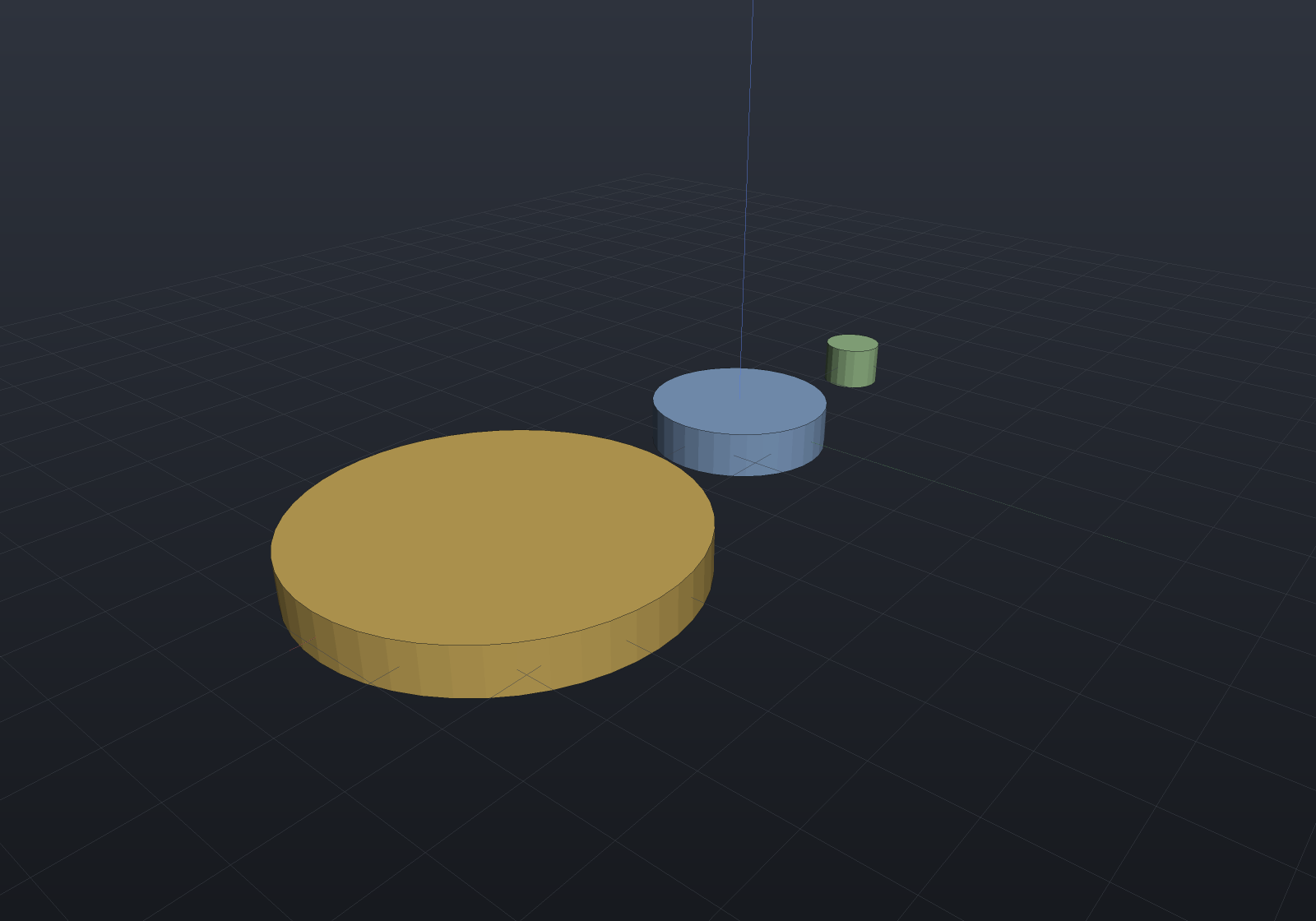
One criterion drives the mesh AND the edge overlay
With fixed counts, the viewer’s feature-edge overlay is deliberately finer than the mesh — exact B-Rep edges sampled at 96+ segments per circle, so bore rims stay smooth however coarse the fill. Zoom onto a large rim and you can watch the cost: the smooth exact edge visibly detaches from the faceted fill it is supposed to outline, and raising the overlay’s count only makes the gap more obvious. The edge was never the problem; the mesh was.
Under an adaptive quality both the display mesh and the feature edges resolve their counts from the same criterion, so they agree by construction at any radius:
var quality = new MeshQuality{    Tessellation = new TessellationQuality { MaxChordDeviation = 0.02, MinSegments = 12 },};var part = new Part("disc", Shape.Cylinder(40, 8));
int expected = quality.Tessellation.SegmentsFor(40);var edges = part.GetFeatureEdges(quality);              // two rimsvar (positions, _) = part.GetMesh(quality).ToIndexed();int rim = positions.Count(p =>    Math.Abs(p.Z - 4) < 1e-9 && Math.Abs(Math.Sqrt(p.X * p.X + p.Y * p.Y) - 40) < 1e-6);
if (edges.Count != 2 * expected) throw new Exception($"overlay {edges.Count} != {2 * expected}");if (rim != expected) throw new Exception($"mesh rim {rim} != {expected}");
What it does and does not change
- Opt-in.
Tessellationdefaults to null and the fixed counts then apply bit-for-bit — no existing model, render or export changes until you set it. - B-Rep route only. The criterion resolves segment counts for tessellation; the
implicit route’s
SdfResolutionis a volumetric grid, not a per-radius quantity, and is deliberately untouched. - Per solid, not per face. The resolution scans the solid’s curvature radii (circular and elliptic edges; cylinder, sphere, revolved, extruded and swept surfaces) and resolves one count pair for the whole solid, sized by the largest radius. Shared edges therefore weld exactly as they always did.
SegmentsFor(radius)is public — the criterion itself, usable anywhere you need the same answer the tessellation used.
Following the camera (opt-in)
A criterion stated in model units is still a guess about how close you will get. The
viewer can instead derive one from the camera: half a device pixel of chord deviation
at the depth being sized, fed to MaxChordDeviation, so a large rim gains segments as you
zoom onto it.
return EngrCad.Configure() .WithAdaptiveDisplayQuality() // window only; off by default .Run(args, BuildScene);Three rules keep it from being a per-frame knob, and each is a decision rather than a tuning constant:
- It fires on SETTLE, never per frame. A pose is evaluated only after it has been held unchanged for 300 ms, and each settled pose exactly once — so a wheel flurry or a drag queues nothing at all.
- A factor of two, or nothing. A settled target is adopted only when it is at least 2× finer than the last one adopted, so a small zoom costs nothing.
- It only ever refines. Zooming back out re-meshes nothing, and the emitted quality
carries the session’s own segment count as its
MinSegments, so no part can resolve below the quality the session started at.Part.RefineMeshenforces the same ratchet per part — it declines a coarser request rather than obeying it — so the guarantee does not rest on the controller’s state surviving a tab switch. A part that visibly loses detail when you pull back reads as a bug even when the criterion is working; the trade is memory, not detail.
Each part is sized by its own depth
A pixel’s world size grows linearly with depth, so sizing every part by the orbit target’s distance over-refines whatever is behind the target and under-refines whatever is in front of it — in a wide scene, by the ratio of the two depths. So the settle, hysteresis and ratchet rules above decide whether a pose is worth acting on, using the target; the deviation each part is then meshed to is measured at that part’s own depth, along the view direction (a part displaced sideways is no further into the screen and is meshed exactly as the target is).
The two spellings agree where they overlap — a part at the target asks for exactly the
scene-level deviation — and the segment counts follow the same n ∝ √(1/depth) the
two-camera oracle measures. The same Ø400 rim, one settled pose, two depths:
| part depth | chord deviation | segments per circle |
|---|---|---|
| 300 (at the target) | 0.1553 mm | 80 |
| 1 200 | 0.6213 mm | 40 |
which is the identical pair of numbers you get by moving the camera 4× closer instead — moving the camera and moving the part are one rule.
// The rule's own answers, checked rather than described. (A headless render never// consults a camera at all — that is the deterministic-one-shot rule below — so the// depths are fed in explicitly.)var camera = new CameraState(0.7, 0.45, Distance: 300, Target: Vector3d.Zero);var eye = CameraMath.Eye(camera.Yaw, camera.Pitch, camera.Distance, camera.Target);var forward = (camera.Target - eye).Normalized();
var rule = new AdaptiveQuality(baseline: null);var rim = (Shape.Cylinder(radius: 200, height: 40)).ToBrep();
foreach (double depth in new[] { 300.0, 1200.0 }){    var quality = rule.QualityFor(camera, 800, eye + forward * depth);    int segments = quality.Tessellation!.ResolveFor(rim).SegmentsPerCircle;    Console.WriteLine($"depth {depth,6}: {segments} segments per circle");    if (depth == 300 && segments != 80) throw new Exception("the near part must resolve 80");    if (depth == 1200 && segments != 40) throw new Exception("the far part must resolve 40");}
A part placed several times is one mesh, so it is sized at the depth of its nearest occurrence — the closest place it appears is the one whose faceting a viewer would see first. The bounds it reads are the display mesh’s, so this costs no lowering.
The re-tessellation runs on a background task under the tab loader’s own generation discipline (a stale result never lands), and it is the tessellate half only — the cached B-Rep lowering is criterion-independent, which is what makes it affordable. The feature-edge overlay is rebuilt with the mesh, so the one-criterion agreement above holds at every refinement.
Two things it deliberately does not do. Headless renders and exports never consult the camera: they are deterministic one-shots at the stated quality, and a PNG whose resolution depended on framing would make the committed documentation images a function of where the camera stood. And the baked ambient occlusion is not re-baked — it stays one level behind, which is what keeps a zoom from costing a bake.
It is off by default because the feel is unmeasured: a background re-mesh triggered by camera motion is exactly the kind of feature that behaves in every test and reads as jerky in the hand. Off, the viewport is byte-identical to what it always was.